

Quick start
agent-marketplace installs shared skills, commands, subagents, hooks, and MCP servers from Git into the folders your coding tools read. In about ten minutes you will install it, add Anthropic's frontend-design skill to a project for Claude Code, browse the skill in the terminal UI, and commit the configuration so every teammate gets the same skill with one command.
Before you begin
You need:
- Git. Run
git --versionto check. - A project folder that is a Git repository. If it isn't one yet, run
git initinside it. - Claude Code, if you want to use the skill at the end.
Install
With Go 1.27.3 or newer, install in one step:
go install github.com/Adyen/agent-marketplace/cmd/agent-marketplace@latestCheck that it works:
agent-marketplace --versionIf Go reports a 404 or an authentication error, run export GOPRIVATE="${GOPRIVATE:+$GOPRIVATE,}github.com/Adyen/agent-marketplace" and try again. If the terminal answers command not found, add Go's install folder to your PATH: $(go env GOBIN) if set, otherwise $(go env GOPATH)/bin (usually ~/go/bin). To download a release binary instead, or to build from source, see more install options.
Coming from an older version?
agent-marketplace refuses to load a root configuration file that doesn't declare apiVersion: agent-marketplace/v4 (included fragments may omit it): commands exit with an error and the TUI shows it, naming the file. Convert configuration before upgrading explains how to fix it.
Open your project
Open a terminal and move into your project folder. Replace the path with your own:
cd ~/code/my-projectThis quick start uses Claude Code so the paths and screenshots match. The same steps work for the other seven supported harnesses, which are coding tools such as Claude Code or Cursor. The harnesses and output paths reference lists where each keeps its files, and How to configure multiple harnesses covers switching later.
Launch
Run the program with no arguments:
agent-marketplaceThis opens the terminal UI (TUI), a full-screen interface that you control with the keyboard.
On first launch you have no personal configuration yet, so the TUI asks which harnesses it should install resources into. Harnesses it finds on your computer are already checked:
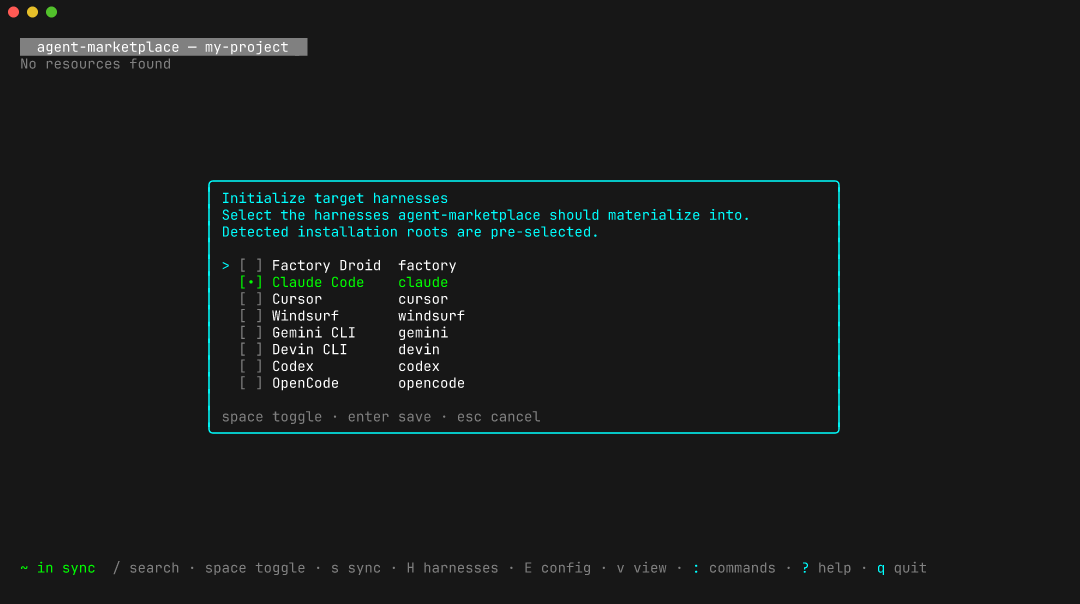
Make sure only Claude Code is checked. Move with the arrow keys, check or uncheck a harness with space, and press enter to save. The TUI saves your choice to ~/.agents/config.yaml, your personal configuration file.
If the TUI opens without asking, you already have a personal configuration. Press H to see or change its harness list.
Press q to leave the TUI for now.
Point the project at a registry
A registry is a Git repository that holds skills, commands, subagents, hooks, or MCP servers. You tell agent-marketplace about it in the project's configuration file, .agents/config.yaml. The file has two parts: sources names where resources come from, and resources says which of them to install from each source. Sources and resources explains how the two fit together.
Copy this whole block, including the final EOF line, and run it. It creates the folder .agents and writes the configuration file. If the project already has .agents/config.yaml, add the source and resource to it by hand instead, because the block replaces the file:
mkdir -p .agents
cat > .agents/config.yaml <<'EOF'
apiVersion: agent-marketplace/v4
harnesses:
  - claude
sources:
  skills:
    git: https://github.com/anthropics/skills.git
    ref: main
    path: skills
resources:
  skills:
    include:
      - skill/frontend-design
EOF
This configuration declares one source named skills: the skills folder of Anthropic's public repository, on the main branch. It then asks for one skill from that source, frontend-design, for Claude Code.
Run the first sync:
agent-marketplace syncSync downloads the registry, writes the skill into Claude Code's folders, and records the exact commit it used in a new lockfile, .agents/lock.yaml. You should see a summary like this:
Installed 2  Removed 0  Malformed 0  Errors 0
  → ~/code/my-project/.claude/.claude-plugin (1 written), ~/code/my-project/.claude/skills (1 written)
"Installed" counts files written. The skill itself is one of them; the other is a Claude Code manifest that lists the installed skills.
If sync fails:
- An error that mentions
gitusually means Git isn't installed or can't reach GitHub. Checkgit --versionand your network connection. - If the summary lists folders other than
.claude, check that theharnesses:lines in.agents/config.yamlmatch the block above. - An error with a code such as
v4.undefined-sourcepoints at a mistake in the configuration, and the message names the setting. Compare your file with the block above; the indentation must match.
The lockfile keeps every teammate on the same commit even when main moves. For a team setup, you can also replace main with a release tag or a commit before you commit the files.
Browse the configured source
Open the TUI again:
agent-marketplaceThe list groups resources by status. frontend-design sits under Enabled, and the registry's other skills sit under Available. The cursor starts on the Enabled heading. Move with the arrow keys; the right pane describes the highlighted skill. To group the list by source or kind instead, press v to open View settings; the TUI reference describes the options.
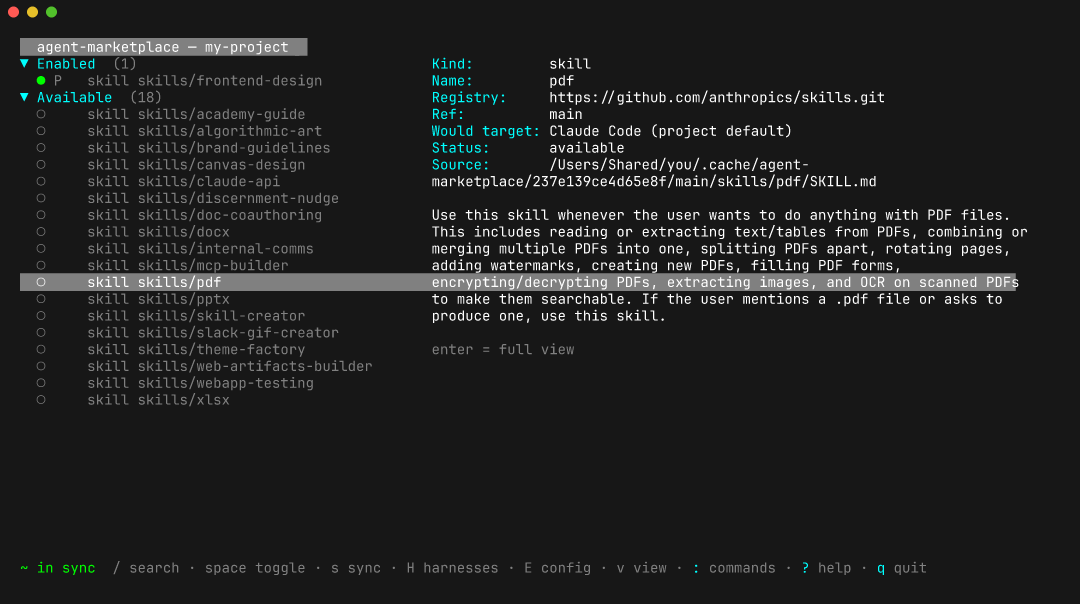
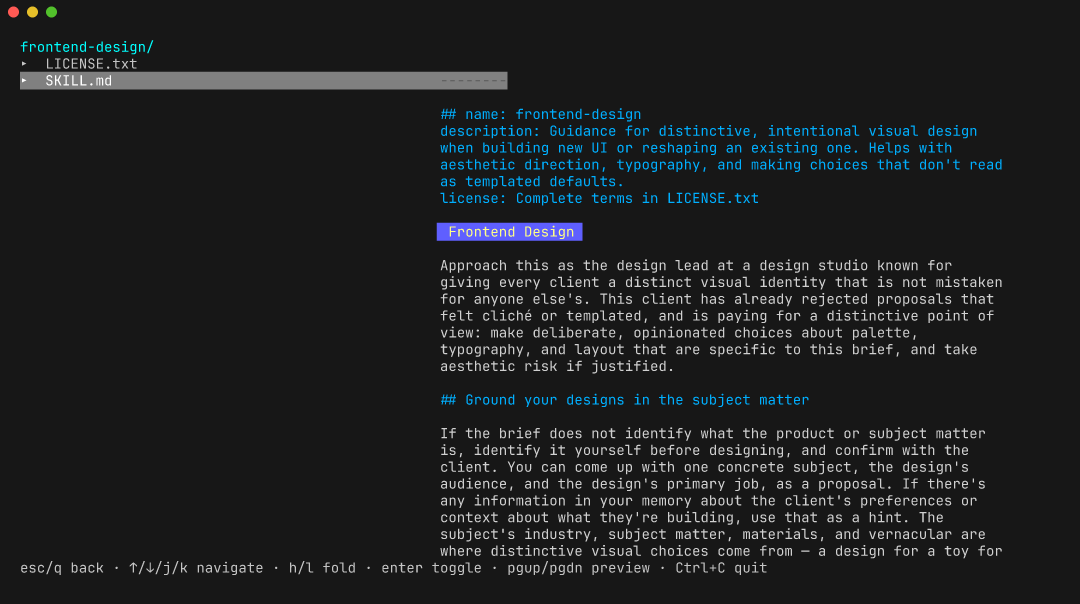
You can read a skill before you install it. Highlight a skill and press enter to open its files: the tree on the left lists them, and the right side shows SKILL.md. Use the arrow keys to open another file, and press esc to go back to the list. On a group heading such as Enabled, enter folds the group instead.
To install another skill, highlight it and press space. In the menu that opens, press p (toggle project) to add the skill to the project configuration, then press s to sync it. You can also edit the resources part of .agents/config.yaml by hand and run agent-marketplace sync.
Press q to quit. If you selected something and didn't sync it yet, the TUI asks whether to sync before quitting.
Check what landed
agent-marketplace statusstatus prints several tables. These matter here (your commit and paths differ):
TARGET HARNESS SET
TARGET HARNESSES  SOURCE
claude            REPO

EXACT REGISTRY LOCKS
SOURCE  REGISTRY                              REF   COMMIT                                         SNAPSHOT
REPO    https://github.com/anthropics/skills  main  sha1:dbd4588f9e1033efb41dad4bef2f7947c8993d44  available

SYNCED RESOURCES
KIND   NAME             HARNESS  SOURCE  ...  REGISTRY                                  REF   CACHE
skill  frontend-design  claude   REPO    ...  https://github.com/anthropics/skills.git  main  locked: sha1:dbd4588f...

DRIFT
In sync
Read them like this:
TARGET HARNESS SETshows that the project configuration (REPO) selectedclaude.EXACT REGISTRY LOCKSshows the commit recorded formain.SYNCED RESOURCEShas a row forfrontend-design.DRIFTsaysIn sync, so the files on disk match the configuration.
The skill is on disk:
ls .claude/skills/frontend-designStart a new Claude Code session in the project, and it picks up the skill.
Commit the config, not the output
Commit the configuration and the lockfile. Keep the generated Claude Code files out of Git, because sync recreates them from the lockfile. Other harnesses write to different folders; the output paths reference lists them.
printf '%s\n' '.claude/skills/' '.claude/.claude-plugin/' >> .gitignore
git add .agents/config.yaml .agents/lock.yaml .gitignore
git commit -m "Add agent-marketplace skills"
A teammate who clones the project runs one command to get the same skill at the same commit:
agent-marketplace syncOn a fresh CI runner, run agent-marketplace sync --locked. It downloads the exact commits and writes the files without changing the configuration or lockfile. Then run agent-marketplace sync --check, which exits with status 1 if anything is out of date. See keeping resources reproducible.
Where next
- Configure multiple harnesses: add Cursor, Codex, Devin, or others alongside Claude Code.
- Install your first skill for Claude Code: the same flow using only commands, installed for your user instead of one project.
- Install from a hosted Marketplace: connect a Marketplace, or install from a browser URL.
- User journeys: what each stage of a resource's life decides, from finding it to removing it.
- TUI reference: every key and modal action.
- Command-line reference:
list,install,remove,sync,update,status, and every flag. - Sources and resources: what the
sourcesandresourcesparts of the configuration do. - Repository configuration reference: every v4 source, resource group, harness, and materialization field.